Practical tips and guides to protect your family in the online world. Learn about parental controls, data privacy, and how to browse the internet safely.
Use 2 Yubico Keys to increase the security of your online accounts.
Discover Yubico Key and increase your online security.
 By Marcos Oliveira Junqueira
Summary
- 1. Introduction
- 2. But how can Yubico Key protect me from phishing by increasing my online security?
- 3. What types of keys are there?
- 3.1. Security Key Series
- 3.2. YubiKey Series 5 (YubiKey 5 Series)
- 4. How to stay safe using a YubiKey? Not one, two!
- 4.1. Advanced Google Account Protection Program
- 4.2. Using Yubico Authenticator on mobile and computer
- 5. Conclusion
1. Introduction
In recent years, we have noticed an increase in the number of online account hacks, such as Instagram, Facebook, Google, YouTube, and several others. In most cases, the hacker deceives the user (phishing), inducing them to provide two-factor authentication codes, sent via SMS, as confirmation for some raffle or prize, and the user, eyeing the prize, ends up allowing unauthorized access without realizing it (see how We Hacked the Hacker did this to my wife).
In addition to this type of attack, criminals can obtain leaked data on the internet through the dark web, use social engineering to try to discover information that may be useful in an attack, or even exploit a common system vulnerability.
As we become more and more connected every day, we must increasingly worry about the security of our information. And because we are connected, our information on the internet is an extension of our lives and the lives of our families, and we must protect it accordingly.
So, if you can have a weapon to protect yourself from hackers and you can get training to use it, why wouldn't you use it? That weapon is the YubiKey.
2. But how can the YubiKey protect me from phishing by increasing my online security?
The YubiKey is the most widespread USB and NFC security key in the world that works with various online services and applications. Usernames and passwords are not secure enough to protect your accounts; to protect yourself, you should use two-factor authentication whenever possible. You can use it very easily as a form of two-factor authentication.
With it, the risk of you suffering a phishing attack is greatly reduced. It's a portable key that's easy to set up and doesn't need a battery or internet connection. It's FIDO certified and works with Google Chrome or any FIDO-compatible application on Windows, Mac OS, or Linux. After registering, each service simply asks you to enter and tap the golden circle on the key to gain access during login.
It is recommended that you have at least 2 keys, the second being a backup in case you lose the main key. To do this, you should replicate the key configuration across all accounts you use.
3. What types of keys are there?
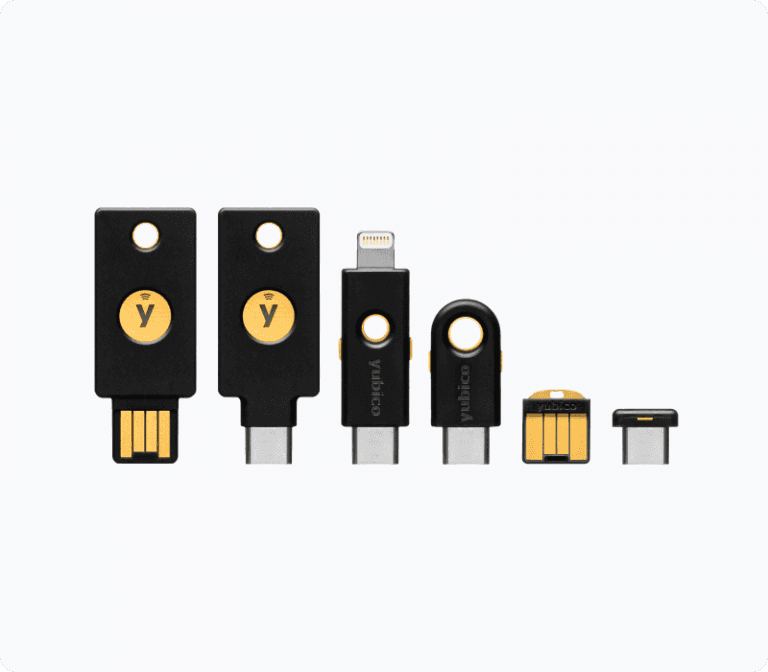
There are several types of keys from various manufacturers, but we will focus on the 2 main types of keys from Yubico.
3.1. Security Key Series
This is the most basic key I recommend for beginners, due to its lower price, around R$ 270.00. This range consists of 2 models with NFC, one with a USB-A connection and the other with a USB-C connection. If your phone doesn't have NFC, but has a USB-C connection, and your computer also has a USB-C connection, use this model. But if your phone has NFC, any model will work.
3.2. YubiKey Series 5 (YubiKey 5 Series)
It is a more complete model with support for several security protocols, such as:
FIDO2 – Based on public-key cryptography for more secure authentication than passwords and codes sent via SMS.
U2F – Open authentication standard created by Google and Yubico. Today it is hosted by the FIDO Alliance.
Smart card – Hardware capable of generating and storing the cryptographic keys that will compose the digital certificates.
OTP – One-time password. Best known for two-step verification code generation apps like Google Authenticator, Microsoft Authenticator and my favorite Yubico Authenticator.
OpenPGP 3 – Open standard for signature and encryption. Allows RSA or ECC signature/encryption operations using a private key stored on a smartcard. De facto standard for email encryption.
Because it's a multi-protocol security key, it provides strong security for legacy and modern environments. It used to cost R$ 500.00, but now it's less than R$ 400.00 and it's well worth it.
This is my favorite security key because it works with all the online systems I use, especially because of its OTP support. When used in conjunction with Yubico Authenticator, it saves the data on the hardware, preventing problems with lost or swapped phones. The Yubico Authenticator can also be used on a computer and will read all keys configured on the hardware. This solves the problem mentioned in the article where we Hacked the Hacker.
4. How to stay safe using a Yubikey? Not one, but two!
To begin with, adding a security key to your accounts will make you very safe, but it's recommended that you have two keys, one as a backup in case you lose the other.
4.1. Google Account Advanced Protection Program
Your Google account (https://myaccount.google.com/), in the security menu (https://myaccount.google.com/security), if you meet the requirements, may have the option to participate in the Google Advanced Protection Program (https://myaccount.google.com/advanced-protection/landing).
This program is recommended for people who have confidential files or valuable information in their Google Account (virtually anyone). To activate the program, you need to add or update your recovery email and phone number so that your access is not blocked by the program's enhanced login security. You also need to activate login with two-step verification using physical security keys, our Yubikey Series 5 or Yubico Security Key Series.
To begin, make sure you have the security keys; you can use two keys of the same type or different types.
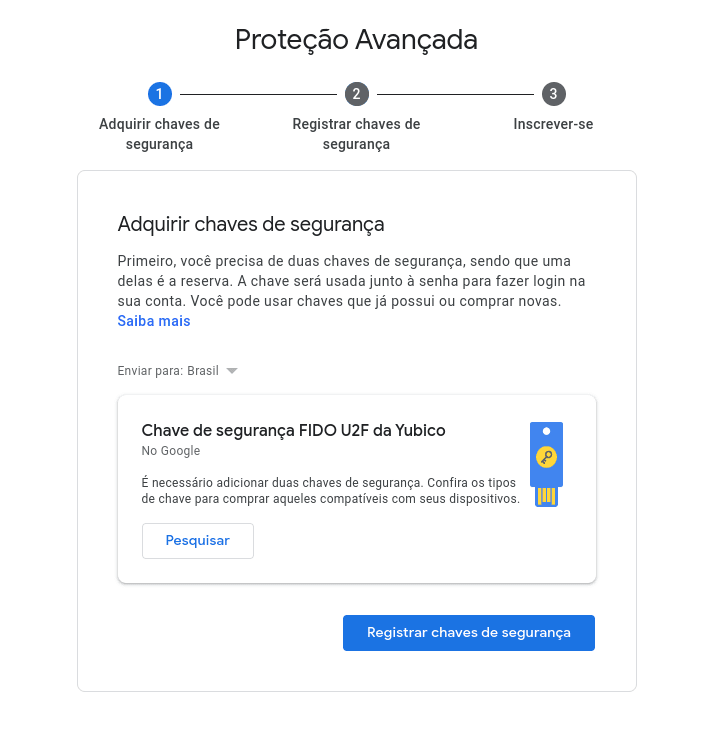
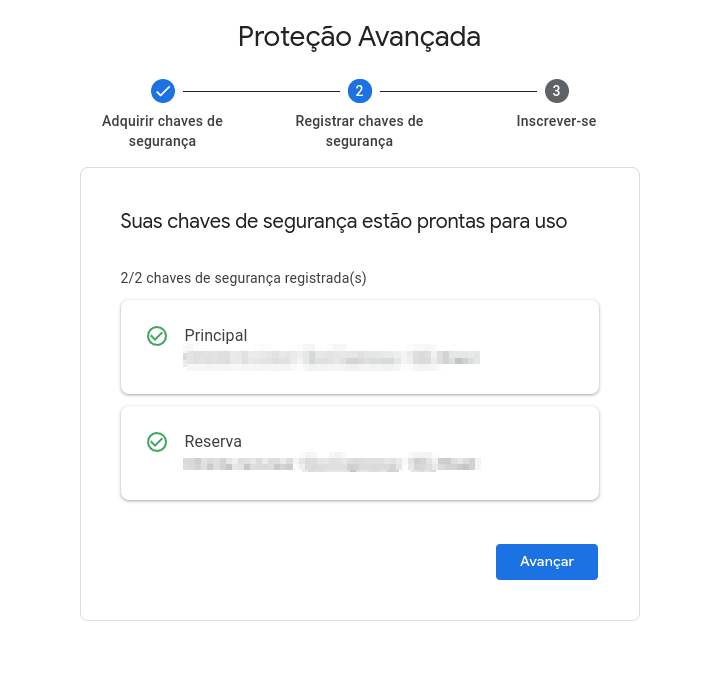
Once you have your security keys, register them by clicking on "add main key" and "reserve key". If you are doing this via NFC on your mobile phone, you can leave the reserve key in the packaging.
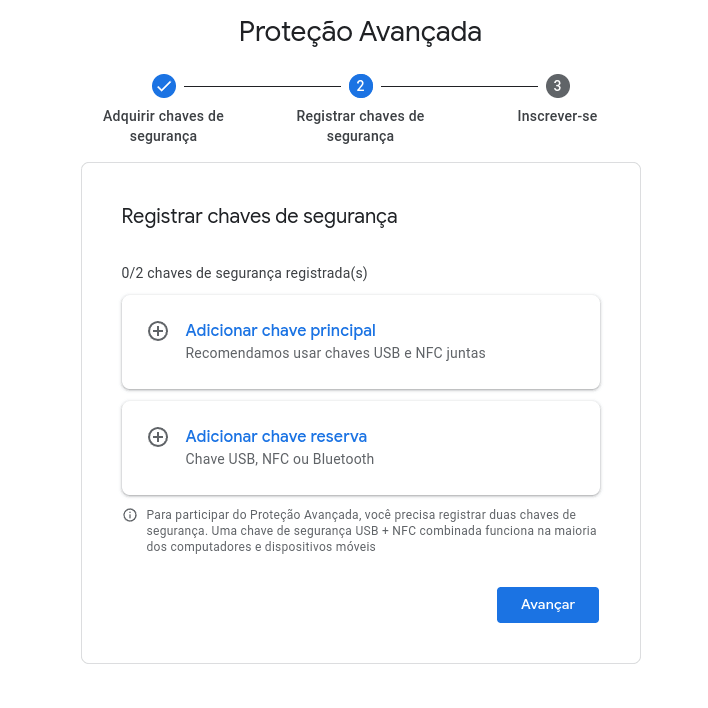
If all goes well, your security keys will be added.
After signing up, you will be disconnected from all your devices and will have to log in again using your password and one of the security keys, so make sure you can do this.
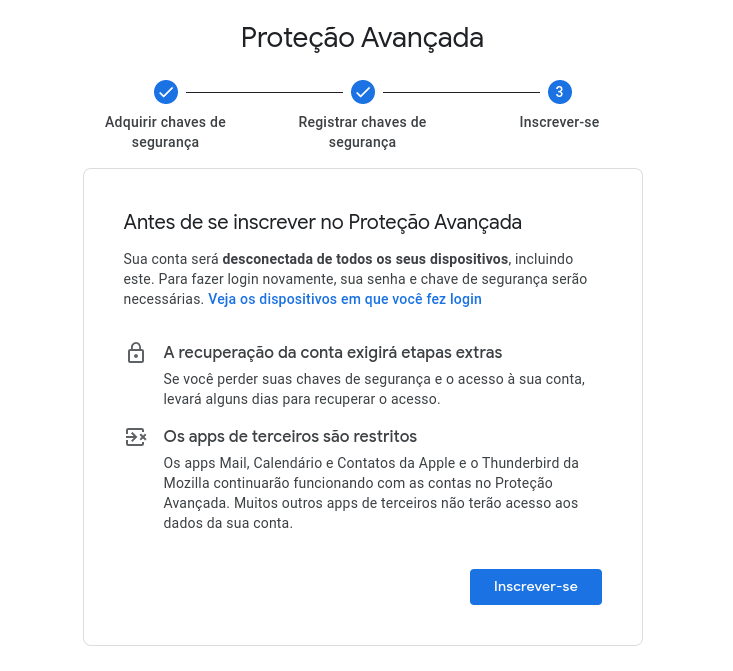
By signing up, some third-party applications may be restricted, but it's best to stay safe.
4.2. Using Yubico Authenticator on mobile and computer
The Yubico Authenticator delivers a more secure and multi-platform authenticator app experience, working on both mobile devices and computers. There are several options:
The Yubico Authenticator for Android has screen capture protection, so check out this short demonstration video.
As I mentioned before, the OTP settings are not saved on the phone, but rather on the security key. If you connect the key to the computer's USB port, the computer's Yubico Authenticator application can use them, just as you use the phone's NFC to display your codes. If your phone doesn't support NFC, it's recommended to use a key with a USB Type-C port. A USB-A to USB-C adapter also worked on my wife's phone without NFC.
5. Conclusion
After 7 months of using both types of keys, the Yubikey Series 5 is the most recommended in all cases, as it has several protocols, with FIDO2 and OTP being the most used.
The ability to save your OTP credentials on the hardware is a plus for this model; even if you lose or change your phone, you can continue using the credentials saved on the security key Yubikey Series 5.
A weak point is the lack of an option to connect via both USB-C and USB-A, avoiding the need for adapters on some phones without NFC. But if you can afford it, get a phone with NFC support and 2 keys Yubikey Series 5.